
If you are a foreigner living or doing business in Indonesia, you must activate and log in to Coretax DJP to file your Annual Tax Return starting Tax Year 2025. The system, managed by Direktorat Jenderal Pajak, replaces DJP Online entirely for SPT reporting.
As tax consultants at InvestinAsia, we guide foreign individuals, KITAS holders, and foreign-owned companies through this process to ensure your activation is valid, compliant, and error-free.
Step 1: Ensure Your Tax Status Is Properly Registered
Before activating Coretax, your tax identity must already exist in the system.
You must have:
- An active NPWP (passport-based or NIK-based if you hold ITAS/ITAP)
- Registered status in the database of Direktorat Jenderal Pajak
If you do not yet have an NPWP, you must register first via e-Registration or directly at your local Kantor Pelayanan Pajak.
For KITAS holders living and working in Indonesia, you are generally treated as a resident taxpayer. Do not use the foreign non-resident SPLN route unless your status explicitly qualifies.
Also read: Rental Tax in Indonesia: A Guide for Tenants and Property Owners
Step 2: Confirm EFIN and Registered Contact Details
Although Coretax centralizes tax services, EFIN may still be required for certain verifications.
You should:
- Apply for EFIN at KPP using passport, KITAS/KITAP, and NPWP
- Ensure your email and phone number match DJP records
If your email or phone number has changed, update it through your KPP or contact Kring Pajak 1500200 before attempting activation.
Most activation failures occur because contact details do not match the database.
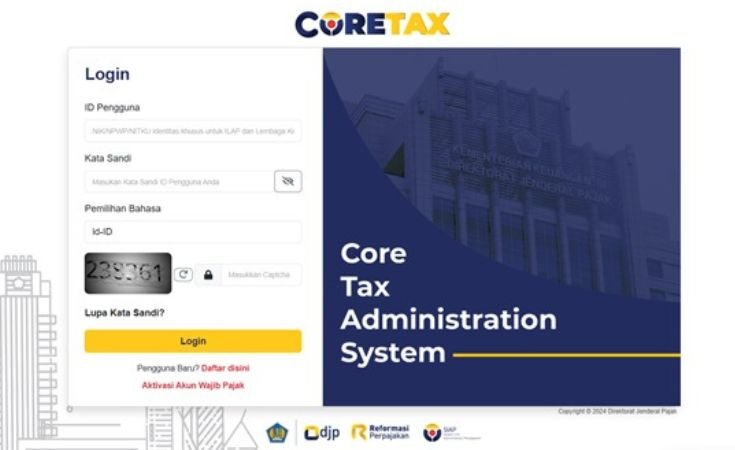
Step 3: Activate Your Coretax Account
This step applies if you already had NPWP before 2025.
- Visit coretaxdjp.pajak.go.id
- Select “Aktivasi Akun Wajib Pajak”
- Confirm you are already registered
- Enter your 15 or 16-digit NPWP
- Input your registered email and mobile number
- Verify identity and submit
If successful, you will receive a “Surat Penerbitan Akun Wajib Pajak” containing:
- Username (usually your NPWP)
- Temporary password
If you receive an identity verification error, check:
- NPWP active status
- Exact spelling of name and birth date
- No extra spaces in data fields
- Browser cache or translation plugins
Also read: Dividend Tax in Indonesia: A Guide and Tips for Foreign Investors
Step 4: First Login and Password Change
Return to the Coretax homepage and choose “Login Wajib Pajak.”
Enter:
- Username: NPWP
- Password: temporary password from email
The system will require you to create a new password with uppercase, lowercase, numbers, and special characters.
Store it securely. This credential will be used for:
- Annual SPT filing
- Payment processing
- Certificate generation
- Tax administration services
From 2025 onward, Annual Tax Return filing is fully conducted inside Coretax.
Step 5: Activate Your Digital Certificate (KO DJP)
To enable e-filing, you must generate a Digital Certificate.
Inside your account:
Portal Saya → Profil Saya → Nomor Identifikasi Eksternal → Digital Certificate
Create a passphrase and generate the certificate.
If status shows “Invalid,” click “Periksa Status” and then “Menghasilkan” until it becomes “Valid.”
Once validated, you can file your Annual Tax Return as a foreign taxpayer in Indonesia.
Also read: Capital Gains Tax in Indonesia: A Guide for Foreign Investors
Common Problems Foreigners Face
- NPWP and passport data mismatch
- Email or phone not synchronized
- Wrong taxpayer classification
- “We cannot verify your identity” errors
- Account already exists but cannot log in
If you see “Taxpayer already has an account,” do not create a new one. Use “Forgot Password” instead.
Why Accuracy Matters for Foreign Taxpayers
Coretax migration introduces stricter data synchronization. For foreign individuals and foreign-owned companies, even minor inconsistencies in identity or residency classification may delay compliance.
This becomes critical if you:
- Hold KITAS and earn Indonesian income
- Are a director or shareholder in a PMA company
- Must file SPT for visa, compliance, or audit purposes
How We Support You
At InvestinAsia, we assist you with:
- NPWP verification and registration
- Coretax activation troubleshooting
- Digital certificate validation
- Annual and monthly tax compliance
Our Indonesia tax consultant and compliance team ensures your Coretax access aligns with your residency status and business structure.
If you are unsure whether your NPWP data is fully synchronized or whether your KITAS classification affects your tax reporting, we recommend a professional review before filing.
Contact us now for FREE consultation and get a special offer!
FAQs
Do foreigners need NPWP to activate Coretax?
Yes. You must already have an active NPWP before activating Coretax.
Is DJP Online still used for Annual Tax Return?
No. Starting Tax Year 2025, reporting is fully moved to Coretax.
What if my Coretax activation fails?
Check identity accuracy, email consistency, and browser issues first. If unresolved, contact KPP or Kring Pajak.
Should KITAS holders use SPLN registration?
No. KITAS holders residing and working in Indonesia typically use resident taxpayer status.
Is the Digital Certificate mandatory?
Yes. It is required for e-filing and electronic tax services in Coretax.